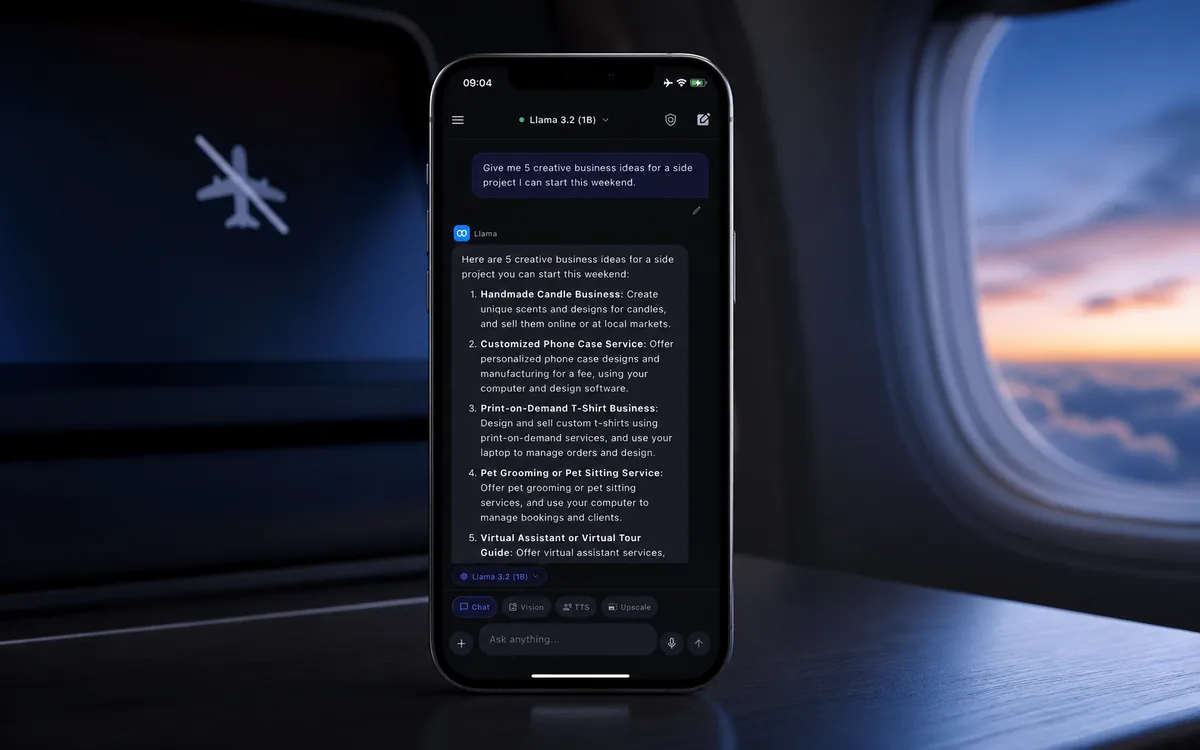
Quick answer: ChatGPT itself generally needs internet on iPhone because prompts are processed by remote cloud models. If you want offline AI chat, you need a local LLM app like Local AI Chat that runs supported models on your iPhone or iPad after setup. That is the difference: cloud ChatGPT is remote; local AI runs on the device.
Why ChatGPT usually needs internet
Most people say "ChatGPT" when they mean any AI chatbot. Technically, ChatGPT is a cloud assistant. Your prompt is sent to remote servers, a model generates the answer, and the answer comes back to your phone. That design is powerful, but it depends on a network connection.
So if your question is "Can I use ChatGPT on a plane with no Wi-Fi?", the realistic answer is no unless the app has a separate offline feature. If your real goal is "Can I use AI chat without internet?", the answer is yes with a local AI app.
This distinction matters because the user experience can look similar. You type a question, the app answers, and it feels like one category. Under the hood, though, cloud AI and local AI are different products. Cloud AI depends on a server. Local AI depends on a model file stored on your phone and an app that can run that model locally.
What an offline AI app does differently
An offline AI app stores the model on the device and runs inference locally. Local AI Chat is built for this pattern on iPhone and iPad. After compatible model files are available, supported local chat can continue even in airplane mode.
That makes offline AI useful in two very practical situations: when the network is unavailable, and when the prompt is private enough that you would rather keep it close to your own device. A local model will usually be smaller than the largest cloud models, but it can be good enough for everyday writing, summaries, explanations, brainstorming, and quick mobile help.
- Install the app. You need internet once to download the app from the App Store.
- Download or import a model. Local AI apps need model files before they can answer offline.
- Test in airplane mode. Ask a simple question to confirm that the selected model is running locally.
Offline AI checklist for iPhone
Cloud ChatGPT vs local AI on iPhone
When local AI is better than ChatGPT
- You are traveling and cannot rely on Wi-Fi.
- You want to ask about private notes, screenshots, or drafts.
- You do not want to create an account or manage API keys.
- You need a fallback assistant when cloud AI is blocked or unavailable.
For example, local AI is a good fit when you want to summarize a journal note, rewrite a message, explain a screenshot, draft a reply, brainstorm a private idea, or study from saved material while commuting. These are not always tasks that require the biggest possible model. They are tasks where convenience, privacy, and availability matter.
How to test whether AI is really offline
The simplest test is direct. Install the app, download or select a supported local model, open a chat, then turn on airplane mode. Ask a short question such as "Summarize this sentence in five words" or "Give me three ideas for a travel checklist." If the app answers normally, that selected local workflow is working offline.
Then test the features you actually care about. If you plan to use image understanding, test an image. If you plan to listen to responses, test text-to-speech. Some apps mix local and cloud features, so the honest question is not only "Does the app work offline?" but "Which parts work offline?"
When cloud ChatGPT is still better
Use cloud AI when you need the strongest available model, live web-connected workflows, very large files, or complex reasoning. Local AI is not magic. It is a practical privacy and offline layer for everyday work.
A good setup can use both. Cloud AI can be your high-capability assistant when you are online and comfortable sending the prompt. Local AI can be the private, offline assistant you keep on your phone for everyday prompts, drafts, screenshots, and travel. The point is not to pretend local AI replaces every cloud workflow. The point is to stop treating cloud upload as the only way to use AI on a phone.
Rule of thumb: Use Local AI Chat for private, offline, everyday mobile AI. Use cloud AI when you knowingly need maximum remote model capability.
Where Local AI Chat fits
Local AI Chat is built for people who want an offline AI chatbot on iPhone or iPad, with supported local models, compatible GGUF imports, image understanding, and text-to-speech. The product is positioned for private mobile workflows: notes, writing, study material, screenshots, travel, and weak network situations.
If you searched for "ChatGPT without internet on iPhone", the practical answer is not to make cloud ChatGPT offline. The practical answer is to use a local AI app for the workflows that should happen on your device.